
Two hours of talking, nine minutes worth posting
DeenClipped transcribes the episode with Whisper, keeping word-level timings, then a self-hosted model reads that transcript and scores candidate moments. It cuts on complete moments rather than fixed intervals, so a clip starts where the thought starts and ends where it lands. Each candidate comes back with short reasons like 'complete ending', 'question hook' or 'stands alone', so you can see why it was picked before watching it. That last one carries the most weight in a long conversation. A good answer that depends on a question asked forty minutes earlier is not a clip.
Captions burned in, timed to the word
Most people watch a podcast clip with the sound off, so captions are burned into the video rather than shipped as a separate file. DeenClipped renders them with libass against the word-level timings from transcription, in four modes — word-by-word, karaoke, phrase and stacked lines — across five templates including Bold Stack, Clean Line and Mono Minimal. The frame is cropped from 16:9 to vertical 9:16 using face detection, so whoever is speaking stays in shot. A background nasheed is mixed under the speech and ducked when someone talks; it is on by default and can be switched off for a job.
Nothing leaves until you approve it
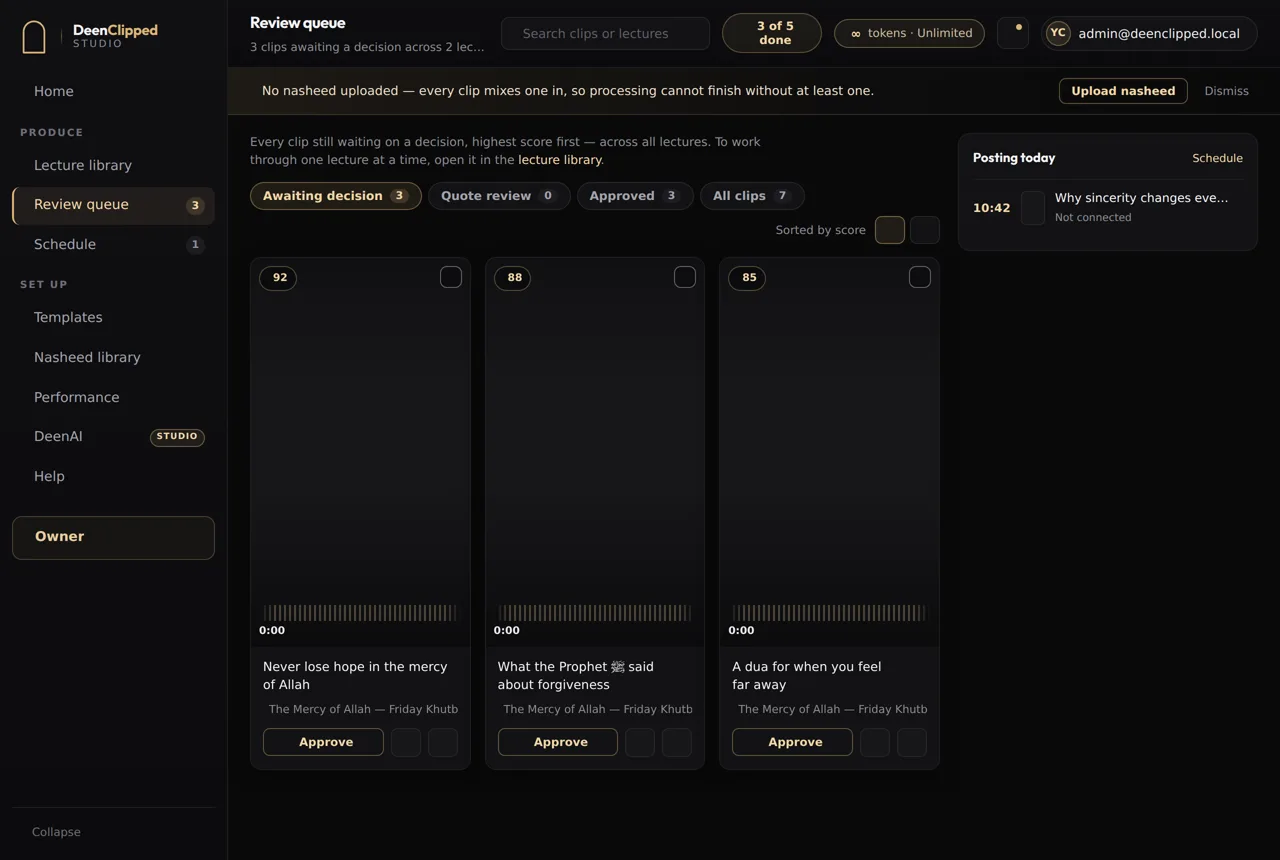
Every clip lands in a review queue and waits for a human decision. You watch the rendered clip itself — the same file that would post — with its score and the reasons it was picked. Approve, reject or send it back; keyboard shortcuts move you through a stack without reaching for the mouse. Approved clips go into posting windows, four a day or eight on Studio, and publish to your connected YouTube, TikTok, Instagram and Facebook accounts. Each destination reports its own state, so one platform refusing does not mark the whole clip failed.
Episodes that switch language mid-sentence
Pin the language to English, Arabic or Urdu, or leave it on auto-detect, which decides per segment instead of once from the opening minute. An English conversation containing Arabic is handled properly: the Arabic is captioned in Arabic, in the Amiri typeface, with an English line beneath it. Recited Quran is matched against a corpus of all 6,236 ayat and rendered as the verse with its translation. Any clip containing scripture is flagged and forced into human review, and that gate never bypasses, whatever else is automated.
You pay for the stretch you point at
Pick a start and an end time before anything is processed. Only that stretch is downloaded from the source, so a twelve-minute selection out of a two-hour episode costs twelve minutes of processing rather than two hours. One token is one source minute, and the minimum selectable range is thirty seconds. Re-rendering a clip, cutting more clips from an episode you have already processed, and editing cost nothing further. Failed renders are never charged, and neither is a clip you reject before it exports. Basic is free: forty tokens over a seven-day trial.
Questions
Can I use a YouTube link, or do I have to upload the file?
Both work. Paste a YouTube URL or upload an MP4 or MOV. Either way you choose a start and an end time first, and only that stretch is downloaded and processed — the rest of the episode is never fetched. The minimum selectable range is thirty seconds.
Does it add captions automatically?
Yes, and they are burned into the video, not handed to you as a subtitle file to upload separately. Transcription produces word-level timings and libass renders against them, so the words land with the speech. You choose between word-by-word, karaoke, phrase and stacked-line modes, and one of five templates. Arabic renders in Amiri with an English line beneath it.
Will it post clips to TikTok and YouTube for me?
Only after you approve them. Every clip waits in a review queue for a human decision — approve, reject or send back — and nothing publishes without one. Approved clips are scheduled into posting windows, four a day or eight on Studio, and go to your connected YouTube, TikTok, Instagram and Facebook accounts. DeenClipped does not report view counts or watch time; no connected platform sends that data back.
What does it cost to clip one episode?
One token is one source minute, charged on the stretch you select rather than the length of the episode. Twenty minutes selected out of a two-hour recording costs twenty tokens. Re-rendering, cutting more clips from an episode you have already processed, and editing cost nothing more. Failed renders and clips rejected before export are never charged. Basic is free: forty tokens over a seven-day trial. Pro and Studio bill weekly, monthly or yearly.
Basic includes the whole workflow.
Import a source, generate clips, review every one and publish to your own connected channels. Upgrade when you need more.